powershell / ai / automation / genai
Stop Rewriting Your AI Scripts Every Time a New Model Wins
PSAISuite gives PowerShell developers one command surface for 15+ GenAI providers, model benchmarking, pipeline context, and tool-calling.
Every week there is a new model at the top of the leaderboard.
That is exciting until you are the one wiring it into scripts, dashboards, agents, benchmarks, and production automation.
One provider wants one request shape. Another provider wants a different model name. Another has a different tool-calling format. Another is fast today and expensive tomorrow. Before long, your PowerShell script is not solving the problem anymore. It is babysitting provider APIs.
That is the itch behind PSAISuite.
It gives PowerShell a single, practical command surface for working across 15+ GenAI providers. Same pattern. Same muscle memory. Swap the model, keep the workflow.
Install-Module PSAISuite
That one line gets you a PowerShell-native way to call OpenAI, Anthropic, Azure AI Foundry, Google, Groq, Mistral, Ollama, OpenRouter, Perplexity, xAI, and more.
The Problem Is Not Calling One Model
Calling one model is easy.
Living with the model ecosystem is the hard part.
You want to ask:
- Which model is fastest for this job?
- Which one follows instructions?
- Which one handles code generation cleanly?
- Which one can use my PowerShell functions as tools?
- Can I switch providers without rewriting the rest of my script?
That is where a thin wrapper is not enough. You need an engineering layer.
PSAISuite is built around a simple idea: your automation should depend on a stable PowerShell interface, not on whichever provider SDK happens to be winning this month.
One Command Surface Across Providers
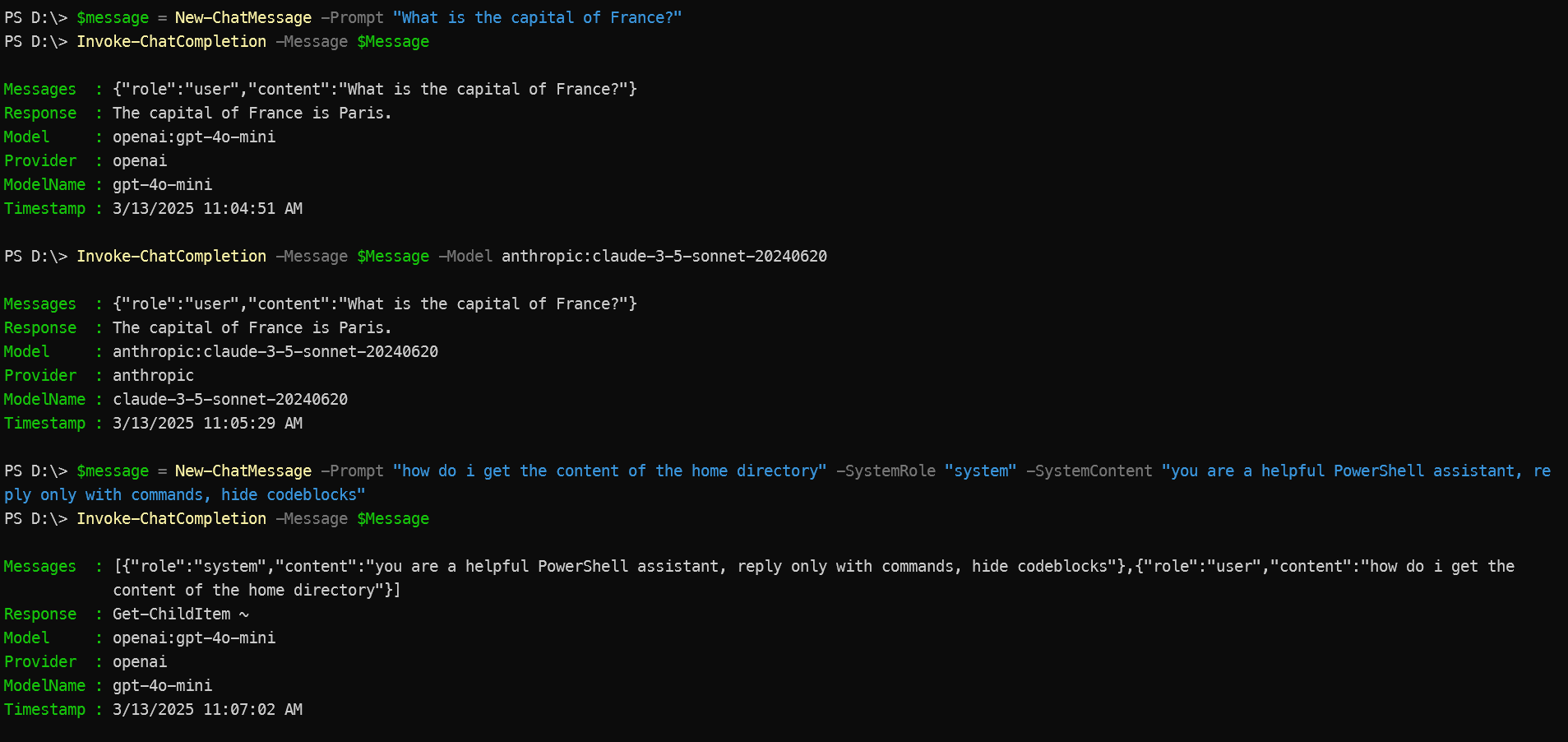
At the center is Invoke-ChatCompletion, with aliases icc and generateText.
Import-Module PSAISuite

$message = New-ChatMessage -Prompt "What is the capital of France?"

Invoke-ChatCompletion -Messages $message -Model "openai:gpt-4o"
Want to try a different provider?
Change the model string.
$models = @(
    "openai:gpt-4o"
    "anthropic:claude-3-5-sonnet-20240620"
    "azureai:gpt-4o"
    "nebius:meta-llama/Llama-3.3-70B-Instruct"
)

$message = New-ChatMessage -Prompt "Explain PowerShell providers in one paragraph."

foreach ($model in $models) {
    Invoke-ChatCompletion -Messages $message -Model $model
}
That model string format, <provider>:<model-name>, is the whole trick. It gives you one place to vary the backend without turning your script into a pile of provider-specific branches.
PowerShell Pipelines Become AI Context
The killer feature is not just chat. It is PowerShell context.
You can pipe command output straight into the model:
Get-Process |
    Out-String |
    icc -Messages "What stands out in this process list?" -Model "openai:gpt-4o-mini"
Or summarize a file:
Get-Content .\README.md |
    icc -Messages "Summarize this document for a busy developer." -Model "openai:gpt-4o-mini"
That makes PSAISuite feel less like a chatbot bolted onto PowerShell and more like another stage in the pipeline.
PowerShell already has the data. PSAISuite gives that data a route into modern models.
Tool Calling Without Leaving PowerShell
Static chat is useful. Tool-calling is where things get interesting.
PSAISuite can expose PowerShell commands or custom tool schemas to supported providers, letting a model request real actions through a controlled interface.
For example, you can let a model use Get-ChildItem:
Invoke-ChatCompletion `
    -Messages "List the files in the current directory" `
    -Tools Get-ChildItem `
    -Model "openai:gpt-4.1"
Or define your own tool:
$customTool = @{
    Name = "Get-Weather"
    Description = "Get current weather for a location"
    Parameters = @{
        type = "object"
        properties = @{
            location = @{
                type = "string"
                description = "City name"
            }
        }
        required = @("location")
    }
}

Invoke-ChatCompletion `
    -Messages "What's the weather in New York?" `
    -Tools $customTool `
    -Model "openai:gpt-4o"
That is a big deal for automation.
It means your existing PowerShell functions can become model-accessible capabilities. Not in some abstract agent diagram. In your shell.
Benchmarks Built For People Who Actually Ship
Leaderboards are fun. Your workload is what matters.
PSAISuite includes PSAISuiteBenchmarks, a benchmark suite for testing models across practical categories:
- Instruction following
- Reasoning
- Code generation
- Latency
Run a benchmark against multiple models:
Import-Module .\PSAISuiteBenchmarks\PSAISuiteBenchmarks.psm1 -Force

Invoke-Benchmark `
    -Models 'anthropic:claude-sonnet-4-6', 'xAI:grok-4-1-fast-non-reasoning', 'openai:gpt-4o' `
    -Category 'InstructionFollowing'
This is where the abstraction pays off. You are not just calling models. You are comparing behavior under the same PowerShell-driven harness.
Fast is good. Correct is better. Fast and correct for your actual automation scenario is the point.
Why This Matters
The AI model market is moving too quickly to hardcode your future into one provider.
PSAISuite gives you room to experiment without throwing away your scripts every time a new model drops. It turns provider choice into a parameter, not a rewrite.
That matters if you are:
- Building PowerShell automation with AI assistance
- Comparing models for production workflows
- Feeding real command output into LLMs
- Testing tool-calling across providers
- Trying local and hosted models side by side
It is not about chasing every shiny model.
It is about keeping your automation flexible enough that you can evaluate the next model without rebuilding the whole thing.
Try It
Install it from the PowerShell Gallery:
Install-Module PSAISuite
Then pick a provider, set the appropriate API key, and try a first call:
Import-Module PSAISuite

$env:PSAISUITE_DEFAULT_MODEL = "openai:gpt-4o"

"Show me three practical uses for AI in a PowerShell pipeline." |
    icc -Messages "Answer for a PowerShell developer."
From there, try another provider. Run a benchmark. Pipe in command output. Register a tool.
The first win is getting a response.
The second win is realizing you can change the model without changing the workflow.